MCP (Model Context Protocol)
MCP is where agent identity gets concrete: a tool call either runs or it doesn't. @helixid/mcp puts a verification step in front of the tool.
npm install @helixid/mcp
The full picture
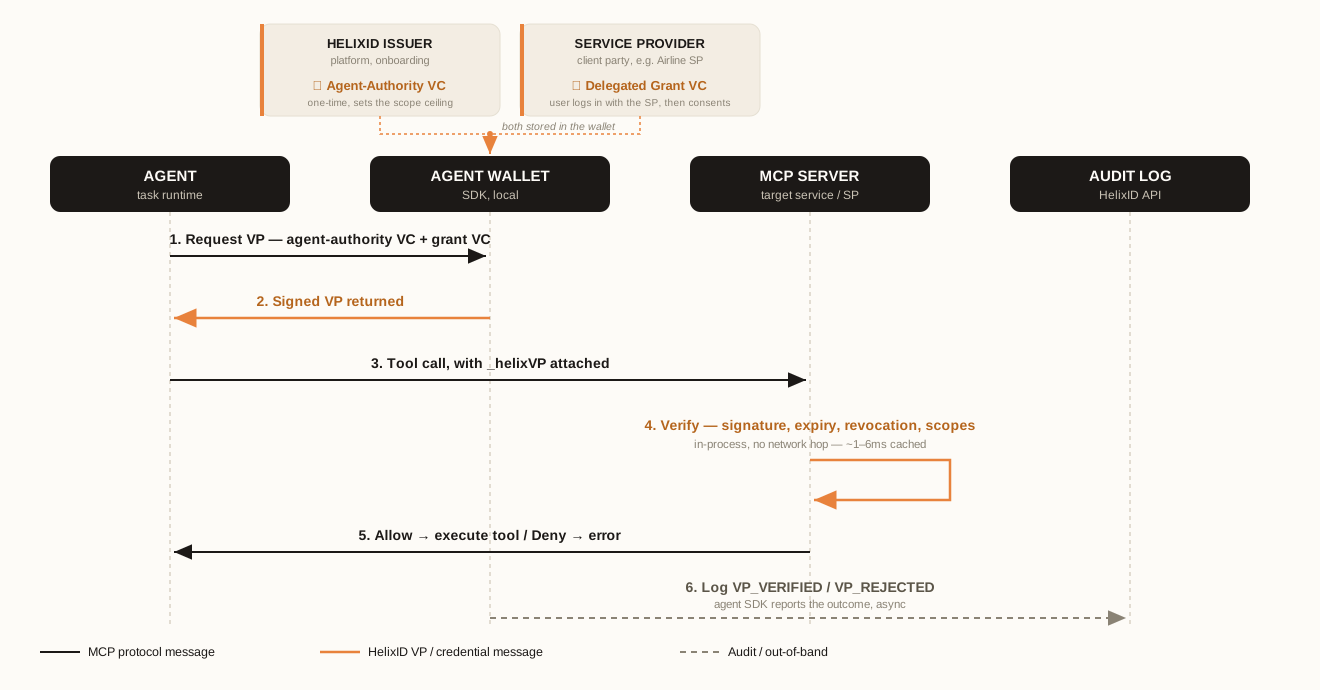
Steps 3 to 5 are what the two exports below do. attachHelixVP produces the call in step 3; helixidMCPMiddleware is step 4, and decides step 5.
Protecting a tool (server side)
import { helixidMCPMiddleware } from '@helixid/mcp';

const requireHelix = helixidMCPMiddleware({
  requiredScopes: ['read:orders'],
});
The middleware requires _helixVP on the tool input, verifies it, and enforces the listed scopes. A call arriving without a valid presentation is refused before the tool runs — the action never happens, and the refusal is recorded.
| Option | Purpose |
|---|---|
requiredScopes | Scopes the caller must hold for the tool to run |
allowSelfSigned | Accept self-issued credentials. Defaults to false. Development only. |
Presenting a credential (client side)
import { attachHelixVP } from '@helixid/mcp';

const outboundCall = await attachHelixVP(
  { name: 'orders.lookup', input: { orderId: 'ORD-1001' } },
  {
    walletPassphrase: process.env.WALLET_PASSPHRASE!,
    walletFilePath: './agent-wallet.enc',
    userDid: 'did:web:user.example.com',
    targetService: 'orders',
  },
);
The wallet is loaded, a fresh VP is signed locally, and _helixVP is attached to the tool input. Signing is local on every call — nothing is cached, and the private key never leaves the agent.
Seeing the denial path
The clearest way to confirm a tool is actually protected is to call it with no presentation at all:
curl -s http://localhost:7100/mcp \
  -H 'content-type: application/json' \
  -H 'accept: application/json, text/event-stream' \
  -d '{"jsonrpc":"2.0","id":1,"method":"tools/call",
       "params":{"name":"book_flight","arguments":{"flightId":"BA249","passengerName":"Mallory"}}}'
The protected tool refuses the booking because HelixID did not receive a valid presentation.
Why MCP is a good fit
An MCP server frequently sits at an organizational boundary — the tools belong to one party, the agent to another. That is exactly the case where a bearer token is weakest: it proves possession of a secret and nothing about who authorized this agent to do this thing, and revoking it breaks every other caller holding the same key.
A presentation carries its own proof of delegated authority, is bound to one target service, expires in minutes, and can be revoked individually. See Comparisons.
Scope discovery for consent
An MCP server's tools/list doubles as a scope catalog: @helixid/widget's resolveConsentScopes() unions the scopes it advertises with the SP's curated fallback to build the list a user sees on a consent page. Tools and consent scopes stay in sync without a second registry to maintain.
A runnable example
examples/framework-middleware exercises the real MCP adapter against the live API:
pnpm example:middleware:setup
pnpm example:middleware:mcp
Demo B — Travel Concierge is the full version: a real LLM agent calling a protected MCP booking tool, plus revocation and delegation.